If your WordPress server suddenly shows:
- High CPU usage
- PHP-FPM processes eating 20–40% CPU
- MySQL looking “fine”
- Apache returning random 504 Gateway Timeout
- And your own server IP appearing millions of times in access logs
You might not be under attack.
You might be attacking yourself.
This post explains how it happened to me — and how I fixed it permanently.
The Symptoms (What I Saw)
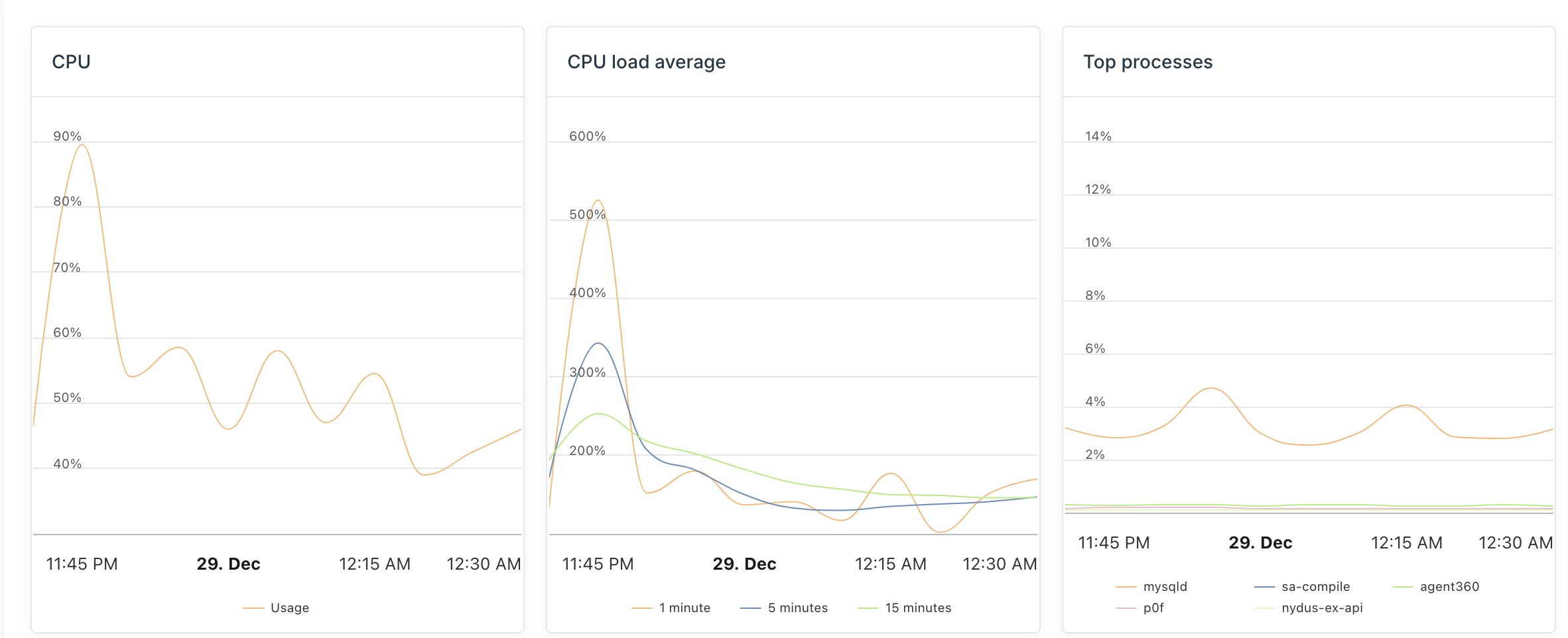
- Load average slowly climbing (1 → 3 → 6)
- PHP-FPM workers piling up
- MySQL not blocked, no long-running queries
- Thousands of 504 errors on tag/category pages
- Access logs showing millions of hits from my own server IP
At first glance, it looked like:
- Bot attack
- SEO crawlers gone wild
- Hosting issue
It wasn’t.
The Root Cause (The Real Problem)
The issue was a self-inflicted DDoS, caused by a combination of:
1. WP Rocket Cache Preload
WP Rocket was aggressively preloading:
- Tag pages
- Category pagination
- Feeds
- Thousands of URLs
And it was doing this from my own server IP.
2. WP-Cron Running on Every Request
WordPress cron jobs were firing:
- On every visit
- During preload
- During crawler hits
This caused Action Scheduler and cron jobs to stack up.
3. Unlimited PHP-FPM Concurrency
PHP-FPM pools had:
- No hard cap
- No termination timeout
So PHP just kept spawning workers until the server choked.
Individually, these are “normal”.
Together, they create a cache-warming feedback loop that melts servers.
How I Confirmed It
Step 1: Check top IPs in logs
awk '{print $1}' access.log | sort | uniq -c | sort -nr | headResult:
1,800,000+ requests from MY OWN SERVER IPThat was the “aha” moment.
Step 2: Check MySQL
SHOW FULL PROCESSLIST;Result:
- No long queries
- No locks
- Database was innocent
Step 3: Check PHP-FPM
- Workers were short-lived but too many
- CPU spikes correlated with preload activity
The Fix (What Actually Solved It)
1. Disable WP Rocket Preload (Critical)
On all affected sites:
WP Rocket → Preload
- Disable cache preload
- Disable sitemap-based preload
- Disable bot preload
👉 Keep caching ON, preload OFF.
2. Fix WP-Cron Properly
Disable cron from running on every request.
wp-config.php
define('DISABLE_WP_CRON', true);Add real cron (every 5 minutes):
*/5 * * * * /usr/bin/php -q /home/USER/public_html/wp-cron.php >/dev/null 2>&1This alone removes massive hidden load.
3. Put Hard Limits on PHP-FPM
In WHM → MultiPHP Manager → PHP-FPM:
Recommended baseline per site:
- pm = ondemand
- pm.max_children = 5
- pm.process_idle_timeout = 10s
- pm.max_requests = 300
- request_terminate_timeout = 30s
This ensures one site can never take the server down.
4. Disable High-Cost Endpoints
Tag and paginated pages are CPU killers.
Block or restrict:
- /tag/*
- /category/*/page/*
- /xmlrpc.php (unless required)
These pages add very little SEO value but consume huge resources.
How I Verified the Fix Worked
CPU & Load
top -o %CPU- Load stabilized around 1–1.5
- CPU idle stayed above 40%
PHP-FPM
- Workers no longer pile up
- Processes exit cleanly
Logs
tail access.log | grep <server-ip>-
No more rapid self-hits
-
No more WP Rocket preload user-agent
Errors
grep ' 504 ' access.log- Old entries only
- No new 504s
Key Takeaways (Learn From My Mistake)
- Cache preload is dangerous on content-heavy sites
- WP-Cron must never run on every request
- PHP-FPM must have hard limits
- High traffic ≠ attack — sometimes it’s just bad configuration
- Your own server IP in logs is a red flag
My Final Setup (Stable & Predictable)
- WP Rocket caching ON
- Preload OFF permanently
- Real system cron
- PHP-FPM capped per site
- Optional: Cloudflare for bots + caching
Since applying this, the server has been stable, predictable, and boring — which is exactly how servers should be.
If this post saves you even one sleepless night debugging “mysterious” high CPU issues, it did its job.
Sometimes the biggest attack comes from inside the server.